
Roblox Build: How to Make a Roblox Game With AI on Your Phone
Roblox Build turns a typed idea into a playable 2D or 2.5D Roblox game in the mobile app. How it works, prompts, credits, publishing, limits and who can use it.
Image: Welcome to Bloxburg by Bloxburg Development (Roblox)
On this page11
- What Roblox Build is
- Who can use Build right now
- How to make a game with Build, step by step
- Writing prompts that work
- What kinds of games Build can make
- Playtesting and sharing
- Publishing your Build game
- Prompts, credits and cost
- Limits to know before you start
- Build or Studio: which should you use?
- Roblox Build FAQ
To make a Roblox game with Roblox Build, open the Build tab in the Roblox mobile app, type a plain description of the game you want, and Build generates a playable version in real time. You then keep sending follow-up messages (“make the coins bigger”, “add a timer”) until it plays the way you want, and tap Publish to put it live on your profile. No coding is needed. The catch is scope: Build makes 2D and 2.5D games today, it is rolling out region by region, and the free prompts per day are limited.
Everything below comes from Roblox’s own Build documentation. Where Roblox has not published a detail, this page says so instead of guessing.
Quick facts
- Where
- Build tab in the Roblox mobile app
- Game types
- 2D and 2.5D (3D announced as coming)
- Cost
- Free daily prompts, then credits bought with Robux
- Who
- Ages 9+ with a completed age check, in rollout regions
- Default audience
- Players 16+
- Coding
- None needed
What Roblox Build is
Roblox describes Build as a mobile-first AI game creation tool that turns ideas into playable, publishable Roblox games. You chat with it, and it handles the parts a solo beginner usually gets stuck on: gameplay mechanics, characters, the environment, visual style, sound and achievements.
The important word is “publishable.” The docs say a published Build game goes onto the same platform that hosts millions of Roblox games and that it is “not a demo or a prototype.” Other people can find it and play it like any other experience.
Build is a separate thing from Roblox Assistant. Assistant runs inside Roblox Studio on a desktop computer and edits the place you have open: scripts, parts, models and assets. Build lives in the phone app and makes a whole game from a conversation. If you want to see every AI feature side by side, the Roblox AI overview covers them all.
Who can use Build right now
Build is available to users aged 9 and older who have completed an age check on their account, in regions where Build is live. Roblox is rolling it out gradually, starting with New Zealand. If you open the app and there is no Build tab, the docs say it may not have reached your region yet. Roblox has not published a date for other countries, including the US.
How to make a game with Build, step by step
- Open the Roblox mobile app and tap the Build tab.
- Type what you want to make in natural language. Write it the way you would explain the game to a friend.
- Send the message. Build generates a playable game covering mechanics, characters, environment, style, sound and achievements.
- Look at what it made and send a change. Each message is a new instruction, for example “slow the enemies down” or “change the background to a forest.”
- Repeat until the game feels right. Roblox says there is no limit on how many times you can refine, other than your prompts and credits.
- When it is ready, tap Publish. A quick safety check runs, and the game goes live on your profile.
If Build stops partway through a game, type “please continue” in the chat. If that does not work, close and reopen the app and try again.
Writing prompts that work
The docs give two starter examples: “A clicker game where I collect coins and buy speed upgrades” and “A side-scroller where I dodge obstacles and collect power-ups.” Their advice is to describe how the game plays, what the player does, and what it looks like.
Compare a vague request with a specific one:
- Weak: “make a fun game”
- Better (Roblox’s own example): “a clicker game where I tap cookies, earn coins, and buy upgrades like faster clicking and auto-clickers”
You do not need to get everything into the first message. Start with the core loop, then add pieces one at a time: a health bar, a timer, faster enemies. When something breaks, tell Build what you expected and what actually happened. Small changes are easier to check than five changes sent together.
What kinds of games Build can make
Build currently focuses on 2D and 2.5D games and works best with simpler game types. The docs list:
- Clicker games (tap to earn, buy upgrades)
- Arcade games (dodge obstacles, collect items, chase high scores)
- Collect-and-score games
- Side-scrollers (platformers, runners, scrolling adventures)
- Puzzle games (logic, timing, pattern matching)
Roblox says more game types are coming, including 3D. If your idea is a 3D obby, tycoon or simulator, Build is not the tool yet. Our step-by-step guide to making a Roblox game covers the Studio route.
Build also refuses some requests. All Build games must follow Roblox’s Community Standards, so prompts can be blocked by content rules, your account’s age setting, or copyright and IP restrictions. Build usually suggests an alternative; rephrasing the idea into something original tends to work.
Playtesting and sharing
When it arrives, a Playtest button lets you try the game at any point while you build. Before publishing, you can share the game privately with up to 10 friends using a playtest link. Playtesters need a Roblox account and must be 9 or older.
Publishing your Build game
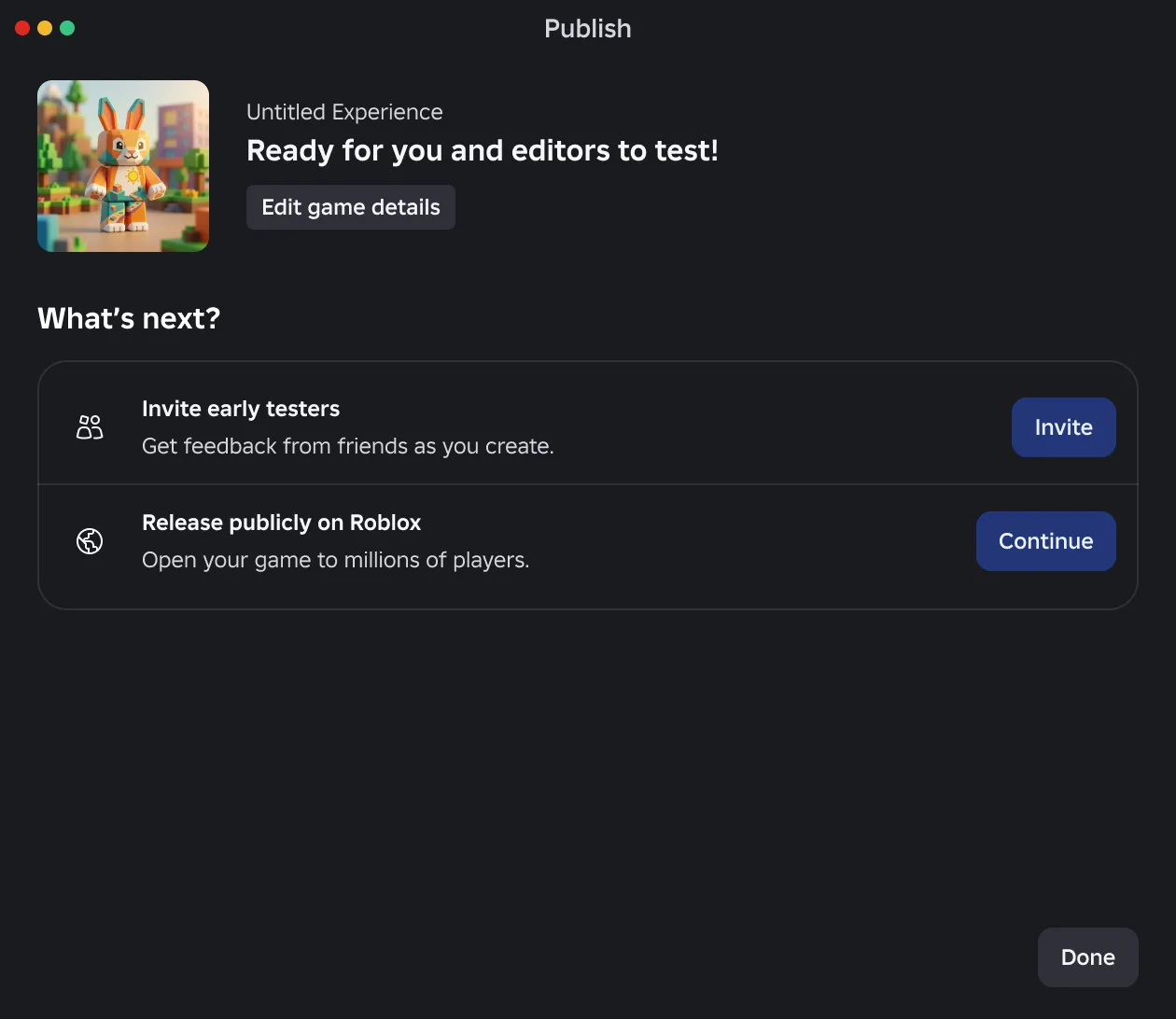
Tap Publish and Build runs a quick safety check, then puts the game live on your profile. The docs say there is no approval process and no waiting. After launch you keep editing in the same Build chat, and the game stays live while you change it.
Two things to know:
- Age rating. Every Build game is set for players 16 and older by default. That is automatic. To open the game to younger players, apply through the Roblox Select process, which includes a content review.
- Your game page. Once it is live, the game has a normal experience page like any other, so a good icon and thumbnail still matter. See our Roblox game icon guide for making one.
Prompts, credits and cost
Each message you send to Build counts as one prompt. You get a set number of free prompts each day, and they reset daily. When they run out you can buy more credits with Robux directly in Build. Purchased credits do not expire. If you run out while a game is still generating, that generation finishes before you are asked to buy more, so you do not lose work in progress.
Roblox has not published how many free prompts you get per day or how much a credit costs in Robux. If you were charged Robux and no game appeared, check your creations first, since a generation in progress usually finishes and shows up there. If it truly failed, contact Roblox Support with your username, the date and time, and any error message.
Limits to know before you start
- One creator per game. You cannot co-edit a Build game with friends.
- Studio is a one-way door. Editing a Build game in Roblox Studio permanently converts it into a standard Studio game and removes its Build status for that version. Your prompt history is saved, so you can recreate the game in Build if needed.
- Mobile only, per the docs. The page describes Build in the mobile app and does not describe a Build mode in Studio.
- 2D and 2.5D only for now.
Build or Studio: which should you use?
Use Build when you want to see an idea playable on your phone today, the idea fits a simple 2D or 2.5D genre, and you are happy for Roblox’s AI to own the details. Use Studio, with Assistant or an outside AI client connected through the Roblox Studio MCP server, when you want 3D, custom scripts, team editing or full control. Many creators will do both: test the core loop in Build, then rebuild a bigger version in Studio. For the full list of options, see Roblox AI game makers compared, and for an outside prototyping tool, Roblox Build vs Higgsfield Games.
Roblox Build FAQ
Is Roblox Build free?
Partly. You get a set number of free prompts each day that reset daily. After that you can buy credits with Robux inside Build, and purchased credits do not expire. Roblox has not published the daily prompt count or the credit price.
Why don't I see the Build tab in the Roblox app?
Build is rolling out gradually, starting with New Zealand, and needs an account aged 9 or older with a completed age check. If the tab is missing, it has probably not reached your region yet.
Can Roblox Build make 3D games?
Not yet. Build currently focuses on 2D and 2.5D games such as clickers, arcade games, collect-and-score games, side-scrollers and puzzle games. Roblox says 3D is coming in a future update.
Can I open my Build game in Roblox Studio?
You can, but editing it in Studio permanently turns it into a standard Studio game and removes its Build status. For full 3D work in Studio, see Roblox Assistant.
Why is my Build game only for players 16 and up?
All Build games are set to 16+ by default. To reach younger players you apply through the Roblox Select process, which includes a content review.
Keep building
Every guide, newest first The Best AI Tools for Roblox Creators (November 2026)The AI tools worth using for Roblox games: Roblox's built-in AI, Claude and Cursor for Luau, Meshy for 3D, Higgsfield for icons and video, ElevenLabs for audio.AI Tools3 min read
 Roblox AI: Every AI Feature in Roblox and Roblox StudioRoblox AI covers Assistant, Code Assist, mesh, material and texture generators, Avatar Setup, the Studio MCP server and Build. What each does and where it is.AI Tools5 min read
 Roblox Build vs Higgsfield Games: Which AI Game Maker Should You Use?Roblox Build publishes simple 2D games to Roblox from your phone. Higgsfield Games builds web prototypes with art. Where each runs, cost, limits, which to use.Tools and Reviews3 min read
 Make a Game With Higgsfield Games and Claude Over MCP, Then Bring the Assets to RobloxConnect Claude to the Higgsfield MCP to prototype a game idea and generate art fast, then move images, textures and video into Roblox Studio. What runs where.AI Tools5 min read
 Roblox Assistant: How to Use the AI Helper in Roblox StudioOpen Roblox Assistant from the mezzanine bar in Studio and type a request. It builds objects, writes scripts and inserts assets. Commands, Plan mode, Skills.AI Tools4 min read
 Roblox Studio MCP: Connect Claude, Claude Code or Cursor to StudioTurn on Roblox Studio's built-in MCP server in Assistant, then connect Claude Desktop, Claude Code or Cursor. Config for Windows and Mac, tools, Higgsfield.AI Tools5 min read