

Roblox Assets and the Toolbox: Find Free Models Safely
Use the Roblox Studio Toolbox and Creator Store for free assets, manage your own with Asset Manager, import 3D files and audio, and spot unsafe models.
Image: Lumber Tycoon 2 by Defaultio (Roblox)
On this page8
To get free assets in Roblox, open the Toolbox from the Window menu or the Home tab in Studio, search the Creator Store tab, and click or drag an item into your place. Before you publish, check every inserted model for hidden scripts. For your own files, import 3D models with File › Import and manage everything in the Asset Manager.
Quick facts
- Toolbox opens from
- Window menu or Home tab
- Toolbox tabs
- Creator Store, Inventory, Recent, Creations
- 3D formats
- .fbx, .obj, .gltf (.glb too)
- Mesh limit
- 20,000 triangles per mesh
- Audio
- mp3, ogg, wav, flac; under 20 MB and 7 min
What the Toolbox holds
The Toolbox is Studio’s window into the Creator Store. It holds models, images, meshes, audio, plugins, videos and fonts made by Roblox or by the community. It also shows what you and your groups have published, so it doubles as your personal shelf.
Across the top you will find the Creator Store, Inventory, Recent and Creations tabs. Inventory covers your published models, decals, meshes, audio, packages, videos, plugins, animations and fonts.
To use something, search, then click it or drag it into the viewport. You can then move it anywhere in the Explorer.
Finding good free assets
Free assets save hours, especially for props and placeholder art while you test a game idea. A few habits help:
- Search with specific words (“wooden fence low poly” beats “fence”).
- Prefer assets from Roblox itself or from creators you recognize.
- Insert into an empty test place first, look at it, then copy it over.
- Watch the triangle count on meshes and the number of parts in models. A beautiful tree with 3,000 parts will slow a map down.
Assistant can also search the Creator Store for you. It covers free and paid assets plus personal and group inventories (Model, Audio, Mesh, MeshPart, Image, Decal, Video and Package types), and /insert_asset inserts an item by ID. See the Roblox Assistant guide.
Free model safety
The Creator Store restricts features used to hide that kind of behavior: obscuring the engine with LuaVMs, getfenv() and setfenv(), and requiring remote assets with require(assetId), loadstring(), InsertService:LoadAsset(), AssetService:LoadAssetAsync() or ModuleScript.LinkedSource.
Our practical check, based on those rules:
- After inserting a model, expand it in the Explorer and look for any Script, LocalScript or ModuleScript.
- Ask whether it needs one. A door might. A rock does not.
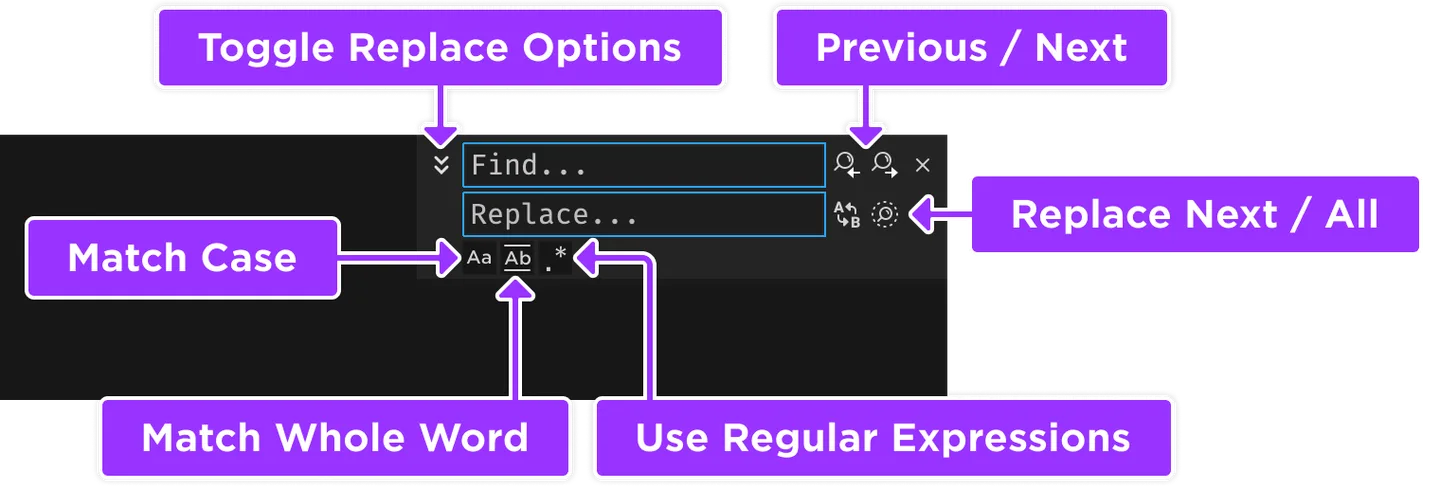
- Use the Script Editor’s find tools to search the scripts for
require(. A require with a number in it loads code from somewhere else. - Also search for
getfenv,setfenvandloadstring. - If anything looks off, delete the scripts or the whole model.
Managing your own assets: Asset Manager
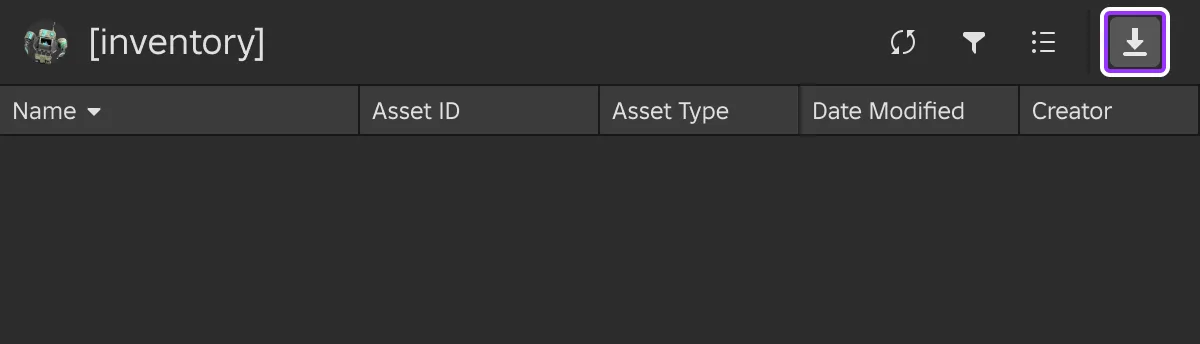
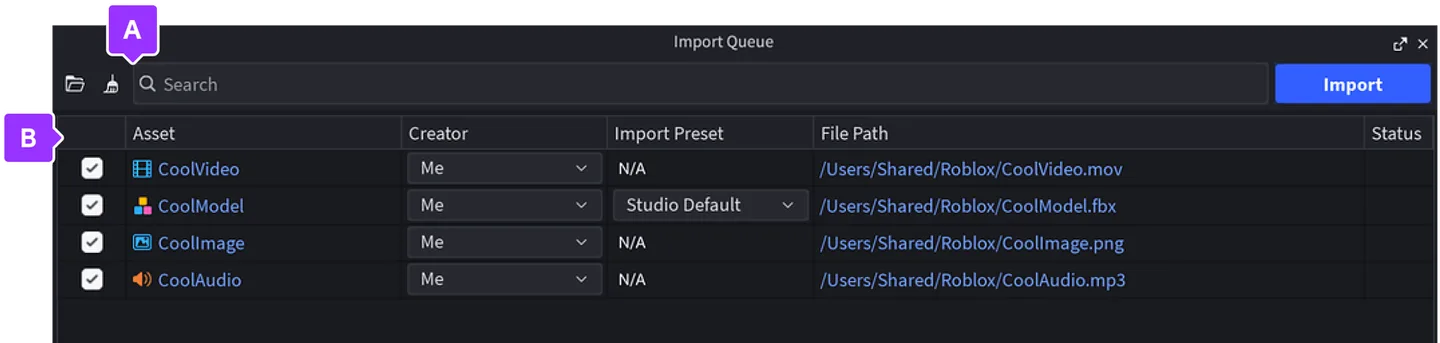
The Asset Manager also opens from the Window menu or the Home tab. It has My Inventory and Group Inventories sections, manages the places in your game, and handles bulk imports, such as dropping in a folder of images or meshes at once.
Uploaded assets get an ID. In code and properties they are referenced as rbxassetid:// followed by the number. Thumbnails of assets use the rbxthumb://type=Asset&id=...&w=150&h=150 format.
Importing 3D models
Open the 3D Importer from File › Import (the Home tab also has Import). It accepts .fbx, .obj and .gltf, and .glb also imports (with a different hierarchy than .fbx). FBX and glTF can carry multiple meshes, hierarchies, basic and PBR textures, cage meshes and rigs, so they are the better pick for anything more than a single static prop.
The Import Preview window shows presets, the object hierarchy and an inspector. Under File General you will find the Upload To Roblox option.
Limits worth knowing before you model: each mesh can have at most 20,000 triangles, and textures max out at 1024x1024. Roblox has not published an import file size limit in MB in the importer docs we read.
If you make models yourself, our Blender to Roblox guide covers the exact export settings. If you generate them with AI, see the best AI 3D model generators for Roblox.
Audio and images
Audio uploads must be a single track in .mp3, .ogg, .wav or .flac, under 20 MB and 7 minutes long. ID verified accounts can import 2,000 free audio assets per 30 days. Unverified accounts get 100 per 30 days. The docs describe audio uploads as free.
For images, Roblox has not published size or format limits on the pages we checked, and we found no Robux cost for image uploads. Check the upload dialog itself for current rules.
Paid assets and licenses
Not everything in the Creator Store is free: Assistant’s asset search, for example, covers both free and paid assets. Whether free or paid, an asset still belongs to the person who made it, so do not re-upload someone else’s work as your own. When you start earning from your game, assets are one more reason to keep a clean list of what you used and where it came from.
Roblox Toolbox FAQ
How do I open the Toolbox in Roblox Studio?
Open it from the Window menu or the Home tab. It lists Creator Store models, images, meshes, audio, plugins, videos and fonts, plus your own inventory.
Are free models in the Roblox Toolbox safe?
Many are fine, but some hide scripts that load other assets at runtime. Search anything you insert for Scripts and for require( followed by a number before you publish.
What 3D file formats can I import into Roblox?
The 3D Importer takes .fbx, .obj and .gltf files, and .glb also imports. Each mesh can have at most 20,000 triangles.
What audio files can I upload to Roblox?
A single track in .mp3, .ogg, .wav or .flac, under 20 MB and 7 minutes. ID verified accounts can import 2,000 audio assets per 30 days, unverified accounts 100.
What is the difference between the Toolbox and the Asset Manager?
The Toolbox is where you browse and insert assets from the Creator Store and your inventory. The Asset Manager manages the assets and places in your game and handles bulk imports.
Keep building
Every guide, newest first Blender to Roblox: Export Settings and Import StepsMove models from Blender into Roblox Studio: official FBX export settings, 3D Importer steps, triangle and texture limits, and Roblox's Blender plugin.Assets and Models4 min read
 The Best AI 3D Model Generators for Roblox StudioWhich AI 3D model generators work for Roblox: Roblox's own mesh generation, Meshy, Rodin, Scenario and Tripo, compared on export formats, free tiers and price.Assets and Models3 min read
 Meshy AI to Roblox: Generate a 3D Model and Import It Into StudioMake a model in Meshy, export FBX or GLB, keep it under 20,000 triangles, and bring it into Roblox Studio with the 3D Importer. Settings, textures and fixes.Assets and Models4 min read
 Roblox Studio Update Notes: November 18 to 24, 2026Roblox Studio update notes for November 18 to 24, 2026, sorted by what you can ship now and what is still in beta, with menu paths, limits and API names.Building and Maps4 min read
 How to Make a Map in Roblox Studio (Terrain, Heightmaps and AI)Make a map in Roblox Studio with the Terrain Editor: Generate, heightmap Import, sculpt and paint tools, plus how Assistant and the Studio MCP help fill it in.Building and Maps4 min read
 How to Make a Roblox Game Step by Step: Your First Obby in One AfternoonA click-by-click beginner tutorial: install Roblox Studio, open Baseplate, build an obby, add a kill brick script, playtest with F5 and publish it privately.Beginners4 min read